> For the complete documentation index, see [llms.txt](https://xai-foundation.gitbook.io/xai-network/llms.txt). Markdown versions of documentation pages are available by appending `.md` to page URLs; this page is available as [Markdown](https://xai-foundation.gitbook.io/xai-network/en/about-xai/sentry-key-setup/step-3-complete-kyc-or-kyb-to-claim-xai-redemptions.md).
# Step 3: Complete KYC (or KYB) to Claim XAI redemptions
You are required to pass KYC before you can claim accrued esXAI to XAI redemptions. BlockPass is the official KYC and KYB provider for Xai Sentry Nodes. Here's how to get started with KYC:
{% tabs %}
{% tab title="Desktop App" %}
If you have not passed KYC and you're using the desktop app, follow the steps below to get started:
1. Navigate to the Sentry Wallet page.
2. Click "Resolve" in the top right corner.
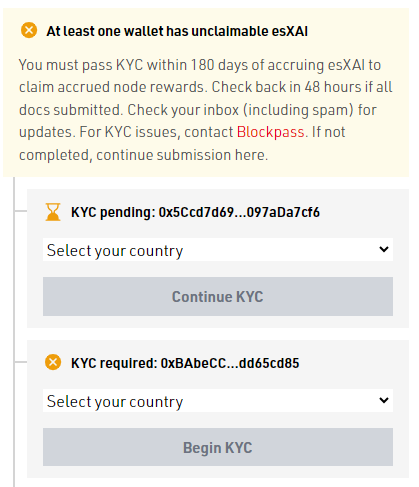
4. Scroll down to the list of wallets
5. Select the country you're located in using the dropdown.
6. Click "Begin KYC".
7. Complete the KYC/KYB form.
{% hint style="info" %}
* A separate alert will display for each wallet that has not passed KYC.
* If the Sentry Wallet (a.k.a. Operator) is not running within 180 days of accruing esXAI, it will be burned.
* If you see "KYC pending", read more about how to interpret a pending KYC status [**here**](/xai-network/en/about-xai/sentry-key-setup/step-3-complete-kyc-or-kyb-to-claim-xai-redemptions/how-to-interpret-a-pending-kyc-status.md).
{% endhint %}
{% endtab %}
{% tab title="CLI (command line interface)" %}
If you have not passed KYC and you're using the CLI, follow the steps below to get started:
1. Type the command "KYC".
2. Find the country you're located in by using the arrow keys or typing the name of the country.
3. Hit 'Enter' on your country.
4. Copy/paste the URL into your web browser.
5. Complete the KYC/KYB form.
{% endtab %}
{% endtabs %}
For KYC issues, be sure to contact [Blockpass](https://help.blockpass.org/hc/en-us/requests/new). After submitting your KYC documents, check your inbox (including spam) for updates that require additional verification. Once you've passed KYC, you'll notice a message like the one below: